
When managing a mail server or transactional email pipeline, receiving a 550 5.7.1 Service Unavailable bounce means the recipient’s Mail Transfer Agent (MTA) rejected your message on policy or security grounds. Under RFC 5321 and RFC 3463 (Enhanced Mail System Status Codes), 550 denotes a permanent failure and 5.7.1 specifically indicates “Delivery not authorized, message refused”—unlike 550 5.1.1, which points to a nonexistent recipient mailbox.
Quick Verdict (TL;DR): SMTP
550 5.7.1 Service Unavailableis a permanent RFC 5321/3463 policy rejection meaning the recipient server refused delivery due to security rules rather than a missing mailbox. Fix it by aligningSPF(under 10 DNS lookups), signing with 2048-bitDKIM, publishingDMARC, configuring Forward-Confirmed Reverse DNS (PTR), and delisting flagged sending IPs from DNSBLs.
Before editing Postfix, Exim, or Exchange configs, run a live deliverability probe to isolate whether DNS authentication or IP reputation triggered the block.
Check Your Mail Health Instantly
Developer Utility · MAIL-TESTER
Mail Tester Workbench
Send a test mail, get a deliverability score
Provisioning isolated testing mailbox...
You can also run an 8-point domain check (DMARC, SPF, DKIM, MX, PTR, MTA-STS, BIMI, and DNSBLs) on our unified Email Health Scorecard, or automate diagnostics directly in your IDE via our MCP server.
Root Causes of SMTP 550 5.7.1 Rejections
1. Missing, Broken, or Over-Limit SPF Records (RFC 7208)
Sender Policy Framework (RFC 7208) publishes the authorized IP ranges and third-party relays allowed to send for your domain. Receiving MTAs trigger 550 5.7.1 when:
- Your sending server’s IP is missing from your
v=spf1TXTrecord. - You published multiple
v=spf1records on the same domain (an automaticPermError). - Nested
include:,a,mx,ptr, orredirectclauses exceed 10 DNS lookups, causing an RFC 7208PermError.
Inspect your exact recursion tree with our SPF 10-Lookup Validator, and compress bloated includes with the SPF Flattener.
2. DNSBL IP Blacklisting (RFC 5782)
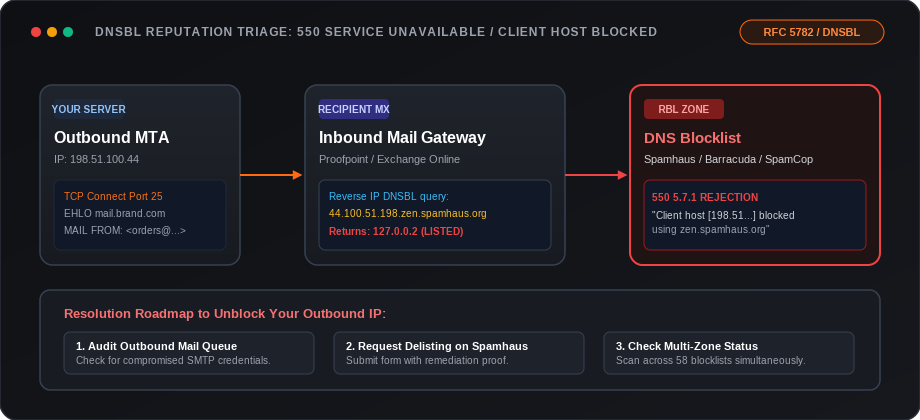
If your egress IP—or another tenant sharing your cloud/VPS subnet—sent spam or compromised traffic, Spamhaus ZEN, Barracuda, or Microsoft’s internal blocklist will reject MAIL FROM or DATA with 550 5.7.1 Service unavailable; Client host [x.x.x.x] blocked.
Check your IP across 7 authoritative DNSBL blocklists directly below or via the standalone IP Blacklist Checker:
Network Diagnostic · BLACKLIST
Blacklist Check Multi-Engine Reputation Matrix
Look up an IP or domain on blocklists. Direct edge diagnostics with zero caching and sub-second global resolution.
Protocol specsRFC
Validated against standard IETF protocol specifications.
- Spamhaus ZEN Multi-List
- Barracuda BRBL Validation
- SORBS Dynamic IP Scanning
- SpamCop + Mailspike + s5h
Edge POP routing12 active
Multi-region edge execution via anycast routing.
Remediation adviceRFC best practice
Actionable configuration guidance for infrastructure.
If blacklisted, verify SMTP banner hostname matches reverse DNS (PTR) and purge compromised relay credentials.
3. Failed DMARC Alignment or Weak DKIM Keys (RFC 7489 & RFC 6376)
When a domain publishes a p=reject DMARC (RFC 7489) record, or when Google/Yahoo/Microsoft enforce sender authentication rules, messages lacking an aligned SPF or DKIM (RFC 6376) signature are rejected at SMTP time with 550 5.7.1.
- Verify active selectors and 2048-bit RSA key strength in our DKIM Key Checker.
- Build a valid
_dmarcpolicy in seconds with the DMARC Record Generator. - Trace raw
Authentication-Resultsheaders using the Email Header Analyzer.
4. Missing Forward-Confirmed Reverse DNS (FCrDNS / PTR)
Mail servers strictly enforce RFC 1912 / RFC 5321 Section 4.1.4 reverse DNS matching. If your SMTP server connects with EHLO mail.example.com, its IP must have a PTR record resolving to mail.example.com, and mail.example.com must resolve back to that same IP (FCrDNS). Verify yours with our Reverse DNS & FCrDNS Validator.
CLI Diagnostics: dig & openssl Verification
Run these commands from an external workstation or mail relay to pinpoint the failing check:
# 1. Inspect SPF, DMARC, and DKIM TXT records
dig example.com TXT +short | grep "v=spf1"
dig _dmarc.example.com TXT +short
dig selector1._domainkey.example.com TXT +short

# 2. Verify Forward-Confirmed Reverse DNS (PTR -> A) for egress IP 203.0.113.25
dig -x 203.0.113.25 +short
dig mail.example.com A +short

# 3. Query Spamhaus ZEN DNSBL (reverse the IPv4 octets)
dig 25.113.0.203.zen.spamhaus.org A +short

# 4. Inspect STARTTLS handshake, certificate, and SMTP banner on port 25
openssl s_client -starttls smtp -connect mail.recipient.com:25 -crlf </dev/null
If step 3 returns an A record in 127.0.0.x (such as 127.0.0.2 or 127.0.0.4), query TXT on the same DNSBL hostname (dig 25.113.0.203.zen.spamhaus.org TXT +short) to retrieve the delisting URL and reason code.
Frequently Asked Questions
What is the difference between SMTP 550 5.7.1 and 550 5.1.1?
550 5.7.1 is a security or policy rejection (failed SPF/DKIM/DMARC, DNSBL block, relaying denied, or missing PTR). 550 5.1.1 (User unknown) means your authentication passed or wasn’t blocked yet, but the specific recipient mailbox does not exist at the destination domain. See our 550 5.1.1 troubleshooting guide for mailbox-level errors.
Can a missing PTR (reverse DNS) record trigger 550 5.7.1?
Yes. Major providers (including Gmail, Outlook/Exchange Online, and Proofpoint gateways) require a valid PTR record matching the server’s HELO/EHLO hostname. You must configure PTR records through your VPS, cloud, or ISP network provider—not your domain registrar’s DNS zone.
Why do emails trigger 550 5.7.1 only at Microsoft 365 or Gmail?
Microsoft’s EOP (Exchange Online Protection) and Google’s SMTP gateways maintain independent IP reputation lists alongside public DNSBLs, and enforce strict DMARC/SPF alignment and EHLO HELO-matching rules. Even if your IP is clean on Spamhaus, a misaligned Return-Path or missing 2048-bit DKIM signature will trigger 550 5.7.1 at those providers.
Next Steps & Related Guides
- Pillar Reference: DNS Record Types Cheat Sheet (MX, SPF, DKIM, DMARC, PTR)
- Deliverability Deep Dive: Why Legitimate Emails Go to Spam (SPF, DKIM & DMARC)
- Mailbox Bounces: How to Fix 550 5.1.1 User Unknown Email Error
- MXToolbox Comparison: Ad-Free MXToolbox Alternative for Email Diagnostics
Stay Ahead on Protocol Changes.
Get authoritative engineering deep dives on bulk sender requirements, post-quantum TLS, and RFC DNS standards directly in your inbox. Zero marketing fluff.
Maximum 1 dispatch per month · Unsubscribe with 1 click