
Nothing stalls a sales cycle or customer onboarding faster than an important invoice or password reset silently landing in the recipient’s spam folder.
You didn’t send spam. You didn’t blast cold lists. You sent a normal transactional message—and Gmail or Outlook still quarantined it.
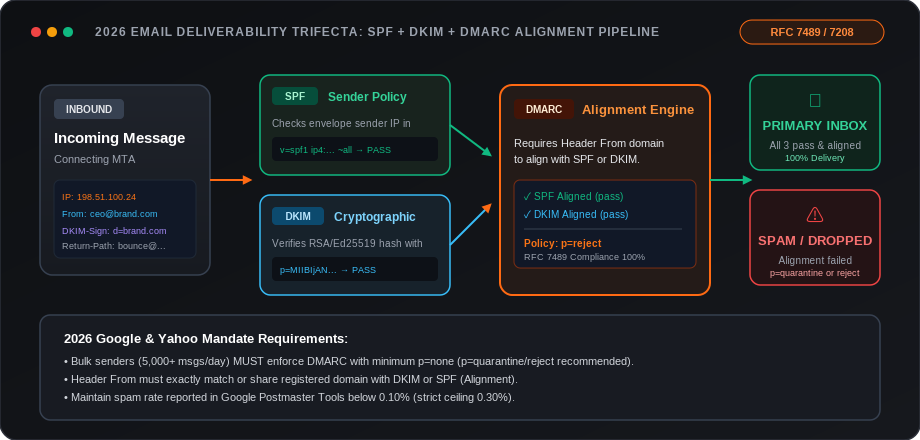
Here is the operational reality: mailbox providers evaluate cryptographic identity before content. Since Google, Yahoo (2024), and Microsoft Outlook (2025) began enforcing strict sender authentication mandates for bulk and business domains, failing SPF, DKIM, or DMARC alignment makes legitimate mail indistinguishable from spoofing to automated filters.
Quick Verdict (TL;DR): Legitimate emails land in spam when domains fail
SPF(RFC 7208),DKIM(RFC 6376), orDMARC(RFC 7489) alignment, exceed SPF’s 10-DNS-lookup limit (PermError), lack Forward-Confirmed Reverse DNS (PTR), or skip DMARC enforcement required by Gmail, Yahoo, and Microsoft. Audit all eight signals at/email-healthand generate compliant records with/dmarc-generator.
The Email Authentication Trifecta (Plus Transport Security)
To prove domain ownership and message integrity across SMTP hops, four DNS-backed controls work together:
- SPF (RFC 7208 — Sender Policy Framework): A single
TXTrecord at your domain apex listing every authorized sender IP and third-party ESP (include:). Strict rule: SPF permits a maximum of 10 DNS-inducing lookups (include,a,mx,ptr,exists,redirect). Reaching 11 triggers an instantPermError. - DKIM (RFC 6376 & RFC 8301 — DomainKeys Identified Mail): Publishes your public cryptographic key under
<selector>._domainkey.<domain>. Every outbound message carries a signedDKIM-Signatureheader proving payload integrity. Use 2048-bit RSA keys (legacy 1024-bit keys fail modern compliance checks). - DMARC (RFC 7489 — Domain-based Message Authentication, Reporting, and Conformance): Published at
_dmarc.<domain>. Requires identifier alignment—meaning either the SPFReturn-Pathdomain or the DKIMd=signing domain must match the visibleFrom:header domain—and specifiesp=none,p=quarantine, orp=reject. - PTR / FCrDNS & MTA-STS (RFC 1912 & RFC 8461): Dedicated mail relays need matching Forward-Confirmed Reverse DNS (
PTR->A) and encrypted TLS transport (MTA-STS) so downgrades or unverified relay IPs don’t penalize trust.
Step-by-Step Verification: Audit Before Editing DNS
Never modify production DNS mail records blind. Run a complete diagnostic across all eight deliverability signals first:
- Run the Unified 8-Point Audit: Check DMARC, SPF, DKIM, MX, PTR, MTA-STS, BIMI, and DNSBL status in parallel on our Email Health Scorecard.
- Trace SPF Recursion Depth: Use our SPF 10-Lookup Validator to catch hidden nested
include:chains (HubSpot + Zendesk + Google Workspace + SendGrid easily exceed 10 queries) and compress them with the SPF Flattener. - Verify 2048-Bit DKIM Selectors: Discover active selectors and verify key bit-length with our DKIM Key Checker.
- Confirm FCrDNS & Transport: Validate reverse PTR matching in the Reverse DNS Validator, strict TLS in the MTA-STS Checker, and raw header hops in our Email Header Analyzer.
CLI Diagnostics: Verify SPF, DKIM, DMARC, and MTA-STS with dig, curl, and openssl
Inspect the live records public mail receivers fetch for your domain:
# 1. Verify exactly ONE v=spf1 record exists and check DMARC + DKIM TXT records
dig example.com TXT +short | grep "v=spf1"
dig _dmarc.example.com TXT +short
dig google._domainkey.example.com TXT +short

# 2. Check MTA-STS DNS flag and HTTPS policy endpoint
dig _mta-sts.example.com TXT +short
curl -s https://mta-sts.example.com/.well-known/mta-sts.txt

# 3. Verify mail exchanger priority and STARTTLS TLS certificate chain
dig example.com MX +short
openssl s_client -starttls smtp -connect mail.example.com:25 -crlf </dev/null 2>/dev/null \
  | openssl x509 -noout -subject -issuer -dates
Deploy DMARC Alignment Safely Without Blocking Valid Mail
Many organizations publish SPF and DKIM but skip _dmarc, which immediately violates Google, Yahoo, and Microsoft sender guidelines—or accidentally jump straight to p=reject before inventorying third-party invoicing and CRM tools.
Use our DMARC Record Generator to create an RFC 7489 record in seconds:
- Phase 1 (
p=none+rua=): Publish"v=DMARC1; p=none; rua=mailto:dmarc@example.com"and inspect weekly aggregate XML reports in our DMARC XML Report Visualizer to spot unauthenticated SaaS senders (like Stripe, Intercom, or Zendesk). - Phase 2 (
p=quarantine): Once 100% of legitimate mail passes aligned SPF or DKIM, escalate top=quarantine; pct=100(and validate live status via our DMARC Analyzer). - Phase 3 (
p=reject): Lock down spoofing completely—required if you ever plan to display a brand logo via BIMI.
Also verify your bulk sender headers implement one-click list unsubscribe (RFC 8058) if sending marketing or lifecycle updates, and compare full feature parity in our MXToolbox Alternative Guide.
Frequently Asked Questions
Does DMARC p=none stop emails from going to spam?
p=none satisfies the minimum requirement to have a DMARC record published for Google/Yahoo compliance, and enables rua= aggregate telemetry so you can fix broken third-party senders. However, p=none does not block spoofers from impersonating your domain; advancing to p=quarantine or p=reject after verifying alignment provides real brand and inbox trust.
What happens if my SPF record exceeds 10 DNS lookups?
Per RFC 7208 Section 4.6.4, evaluating an 11th DNS-querying mechanism (include, a, mx, ptr, exists, redirect) forces a PermError result—meaning SPF authentication fails entirely for every email you send. Audit your tree with our SPF 10-Lookup Validator and flatten redundant includes.
Do I need both SPF and DKIM to pass DMARC?
Under RFC 7489, DMARC passes if either SPF passes with domain alignment (aspf) or DKIM passes with domain alignment (adkim). In practice, configuring both guarantees resilience: when recipients auto-forward emails, SPF breaks on the forwarding hop while DKIM signatures survive intact.
Related Cluster Guides
- Cornerstone Reference: DNS Record Types Cheat Sheet (SPF, DKIM, DMARC, MX, PTR)
- Policy Rejections: How to Fix 550 5.7.1 Service Unavailable Error
- Mailbox Bounces: How to Fix 550 5.1.1 User Unknown Email Error
- Safe DNS Moves: Zero-Downtime DNS Migration Checklist
Stay Ahead on Protocol Changes.
Get authoritative engineering deep dives on bulk sender requirements, post-quantum TLS, and RFC DNS standards directly in your inbox. Zero marketing fluff.
Maximum 1 dispatch per month · Unsubscribe with 1 click