
Moving DNS hosting (for example to Cloudflare, AWS Route 53, or NS1) is a common cause of broken email and “site down for some users” incident reports. Most cutover failures happen when wildcard records, DKIM selectors, or DNSSEC DS keys are missed before switching registrar nameservers.
Quick Verdict (TL;DR): To migrate DNS without downtime, lower record TTLs to
300seconds one full old-TTL window ahead, copy all apex, subdomain,MX,SPF,DKIM, andDMARCrecords verbatim (never proxying mail hostnames), verify responses directly against the new authoritative nameservers withdig, coordinateDNSSECDSkeys before changing registrarNSrecords, and monitor global cache expiry.
Step-by-Step Zero-Downtime DNS Migration
1. Export Every Record and Hidden Subdomain
Run the domain through the DNS lookup and export all A, AAAA, CNAME, MX, TXT, CAA, NS, and SRV records. If your current provider offers a BIND-style zone file export, download it as your baseline.
Because a standard zone query only returns hostnames you explicitly ask for, run a subdomain finder search to map public and legacy hostnames (mail, autodiscover, smtp, app, stage, _domainkey, _dmarc) that must exist on the destination nameservers before cutover.
# Capture current baseline records before modifying anything
dig example.com ANY +noall +answer
dig example.com MX +short
dig example.com TXT +short
dig _dmarc.example.com TXT +short
dig example.com CAA +short
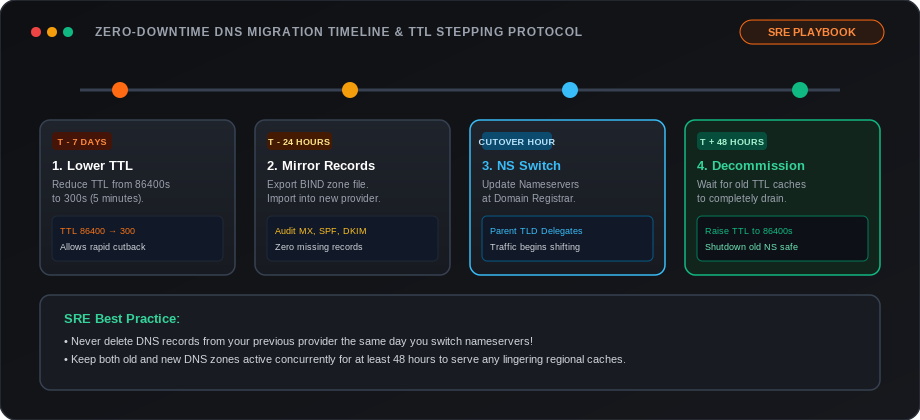
2. Lower TTLs One Full Window Ahead
Lower the TTL on records that will change to 300 seconds (5 minutes) at least one full old-TTL cycle prior to migration—for example, 24 hours ahead if existing records use 86400. Per RFC 1035 and RFC 2308, recursive resolvers continue serving cached answers (and negative NXDOMAIN answers bounded by the SOA minimum TTL) until the original timer expires.
Consult our DNS Records & TTL Matrix for safe pre-migration and post-migration values.
3. Recreate Records Exactly Without Proxying Mail
Import or create every record at the new provider and double-check RFC constraints:
- Apex CNAME prohibition (RFC 1034 / RFC 2181): Never place a standard
CNAMEon the zone apex (@), because aCNAMEcannot coexist withSOA,NS, orMXrecords. Use provider-nativeALIAS/ANAME/ CNAME flattening instead. - Single SPF record (RFC 7208): Merge sending services into one
v=spf1TXTrecord and keep DNS-inducing mechanisms (include,a,mx,redirect) at or below 10 lookups using our SPF 10-lookup validator. - Mail proxies off: If your new DNS provider offers HTTP reverse-proxying (e.g. orange-clouding), keep
MXtargets (mail.example.com) and mail-submission hostnames set to DNS-only so SMTP traffic on port 25/587 reaches your actual mail server. - DKIM & DMARC: Copy
<selector>._domainkeyTXTkeys verbatim (use our DKIM key checker to confirm 2048-bit RSA strength) and verify_dmarcalignment with our DMARC analyzer.
4. Test the New Nameservers Directly Before Switching
Never switch registrar NS records blind. Query the new authoritative nameservers directly with +norecurse (RD=0) and compare every answer against your baseline export. Verify DNS Zone Health, MX routing, SPF, and email deliverability health, then track global resolver convergence using our DNS Propagation Checker and confirm TLS/HTTP termination on the new origin IP:
# Query the new nameserver directly before updating registrar NS
dig @ns1.new-dns-host.example example.com A +norecurse +short
dig @ns1.new-dns-host.example example.com MX +norecurse +short
dig @ns1.new-dns-host.example _dmarc.example.com TXT +norecurse +short
dig @ns1.new-dns-host.example selector1._domainkey.example.com TXT +norecurse +short

# Test TLS handshake & HTTP headers against the destination IP
openssl s_client -connect 203.0.113.10:443 -servername example.com </dev/null 2>/dev/null | openssl x509 -noout -dates -subject
curl -sI --resolve example.com:443:203.0.113.10 https://example.com | head -n 10
5. Coordinate DNSSEC and Update Registrar Nameservers
If DNSSEC (RFC 4034 / RFC 4035) is enabled at your registrar, disable DNSSEC (remove the parent DS record and wait one DS TTL) or perform a multi-signer DNSKEY/DS pre-publication rollover before switching NS records. Changing nameservers while a stale DS record remains at the TLD registry causes validating resolvers (1.1.1.1, 8.8.8.8) to return SERVFAIL globally.
Once DNSSEC is clean, replace the NS delegation records at your domain registrar with the new provider’s nameservers. Keep the old zone active for at least 48–72 hours so resolvers holding stale NS delegation caches still receive valid answers.
6. Watch Global Propagation and Verify Live Traffic
Use the global DNS propagation checker to watch the NS, A, and MX cutover converge across worldwide Anycast resolvers. TLD registries frequently cache NS records for 24–48 hours regardless of your zone apex TTL.
After cutover, re-verify:
- Authoritative delegation & glue with the DNS zone health audit
- TLS certificate validity and
CAAissuance locks with the SSL certificate checker - DNSSEC chain-of-trust status with the DNSSEC validator
- Live inbox delivery by sending test messages to external Gmail and Outlook accounts
7. Clean Up After Cache Convergence
Once 72 hours pass with zero stale hits on the old nameservers, decommission the old DNS zone, restore steady-state TTLs (3600s–14400s for web/mail, 86400s for NS/CAA), and document the migration date in your runbook.
Common Migration Pitfalls
- Switching registrar nameservers before copying DKIM selector records or Google/Microsoft TXT verification tokens.
- Publishing two separate
v=spf1TXT records instead of merging mechanisms into one record (instantPermErrorunder RFC 7208). - Proxying
mail.example.comthrough a web CDN proxy, breaking inbound SMTP (25) and IMAP (993) TCP connections. - Leaving an outdated
DSrecord at the registrar while moving to unsigned nameservers, causingSERVFAILacross DNSSEC-validating networks.
Frequently Asked Questions
How early should I lower DNS TTL before switching nameservers?
Lower record TTLs to 300 seconds at least one full old-TTL duration ahead of the cutover. If your A and MX records currently use an 86400-second (24-hour) TTL, drop them to 300 seconds at least 24 hours before migrating so cached entries expire before you touch anything.
Why does DNSSEC break sites during a nameserver migration?
Validating recursive resolvers verify that the child zone’s DNSKEY matches the parent TLD’s DS hash (RFC 4035). If you point your registrar’s NS records to a new DNS host whose keys don’t match the old DS record—or that doesn’t sign responses at all—validating resolvers treat the zone as spoofed (Bogus) and fail resolution with SERVFAIL.
Should I proxy MX or mail subdomains through a CDN?
No. Web CDN reverse proxies only forward HTTP/HTTPS ports (80/443) and strip or reject SMTP/IMAP/POP3 traffic. Keep MX hostnames (mail.example.com) and autoconfig/autodiscover records unproxied (DNS-only) pointing straight to your mail server’s IP.
Related Guides & Reference
- Cornerstone Reference: DNS Record Types Cheat Sheet & TTL Matrix
- Caching Deep Dive: Why Does DNS Propagation Still Take So Long?
- Cryptographic Trust: Understanding DNSSEC and How to Check It
- Email Deliverability: Why Legitimate Emails Go to Spam (SPF, DKIM & DMARC)
Stay Ahead on Protocol Changes.
Get authoritative engineering deep dives on bulk sender requirements, post-quantum TLS, and RFC DNS standards directly in your inbox. Zero marketing fluff.
Maximum 1 dispatch per month · Unsubscribe with 1 click