
We have all been there. You deploy a new service, update your A or CNAME record, and tell the client it is live.
Then they hit refresh, and the browser still loads the legacy server.
“That’s just DNS propagation,” you tell them. “Give it 24 hours.” Meanwhile, it feels absurd that updating a single IP mapping across the internet still lags behind real-time infrastructure. Here is what is actually happening beneath the hood—and how to control it.
Quick Verdict (TL;DR): DNS propagation is not a global file transfer—it is distributed cache expiry governed by
RFC 1035recordTTLtimers andRFC 2308negative-cachingSOAminimums. Authoritative nameservers update immediately, while ISP and recursive resolvers cache old answers until their timer expires. Lower TTLs to300seconds beforehand and verify global consensus with/dns-propagation.
Why Authoritative Changes Aren’t Instant Everywhere
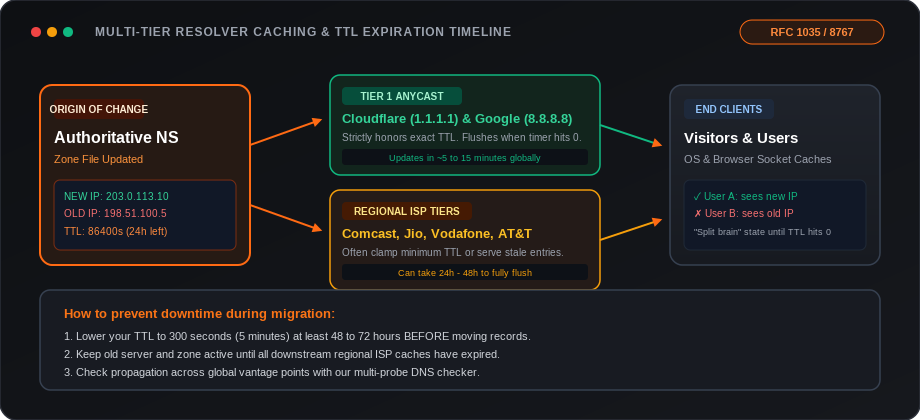
When you save a record in Cloudflare, Route 53, or Namecheap, the authoritative nameservers typically synchronize across Anycast PoPs in seconds. The delay comes from every caching layer sitting between your user and that authoritative zone:
- Recursive Resolvers (
1.1.1.1,8.8.8.8, ISP DNS): Per RFC 1035, every recursive resolver caches the returned record for the exact Time-To-Live (TTL) integer attached to the previous response. If your oldArecord carried a86400-second TTL (24 hours), any ISP that cached it five minutes before your edit will keep serving the stale IP for 23 hours and 55 minutes. - Negative Caching (
SOA MINTTL— RFC 2308): If someone queriedstaging.example.combefore you created the record, resolvers cachedNXDOMAINfor the duration of the zone’sSOAMINIMUMfield (commonly300–3600seconds)—even if you later publish the new record with a60-second TTL. - TLD Registrar
NSDelegation Caching: Changing authoritative nameservers (NS) at your registrar takes longer than changingAorTXTrecords because.com/.orgTLD registries publish highNSTTLs (often 48 hours /172800s) that recursive resolvers respect independently of your zone file. - OS Stub & Browser DoH Caches: Windows, macOS,
systemd-resolved, and Chrome (RFC 8484 Secure DNS) maintain their own local host caches.
CLI Verification: Inspect Remaining TTLs Across Resolvers
Stop hitting browser refresh and inspect exact remaining cache timers directly using dig and DNS-over-HTTPS curl:
# 1. Compare remaining cached TTL at Cloudflare (1.1.1.1) and Google (8.8.8.8)
dig @1.1.1.1 example.com A
dig @8.8.8.8 example.com A

# 2. Query your authoritative nameserver directly (+norecurse) to verify the live zone
dig example.com NS +short
dig @ns1.yourhost.example example.com A +norecurse

# 3. Inspect Google DoH JSON response and live TTL countdown via curl
curl -sH 'accept: application/dns-json' 'https://dns.google/resolve?name=example.com&type=A'
Watch the second column of dig’s ANSWER SECTION: if 1.1.1.1 shows example.com. 142 IN A ..., that cache expires in 142 seconds. If your authoritative query (@ns1) already returns the new IP, your zone edit is 100% live and you are strictly waiting out old resolver TTLs.
How to Force Fast Cutovers Without Waiting Days
You cannot remotely purge an ISP’s cache, but you can engineer every DNS cutover so convergence takes minutes instead of days:
1. Step Down TTLs Before Your Maintenance Window
If you plan a server or DNS migration on Friday, lower the target record’s TTL to 300 seconds (or 60 seconds) at least one full old-TTL cycle ahead (Wednesday if old TTL was 86400). Consult our DNS Records & TTL Matrix before planning cuts.
2. Flush OS and Browser DNS Caches Locally When testing from your own machine:
- Windows:
ipconfig /flushdns - macOS:
sudo dscacheutil -flushcache && sudo killall -HUP mDNSResponder - Linux (
systemd-resolved):sudo resolvectl flush-caches - Chrome: Open
chrome://net-internals/#dns-> Clear host cache
3. Verify Global Edge Consensus Instead of Guessing Query regional Anycast resolvers in parallel using our Global DNS Propagation Checker to verify convergence percentages across continents, inspect individual records in our DNS Lookup tool, and audit delegation health in the DNS Zone Health Checker.
If our DNS Propagation Checker confirms 1.1.1.1, 8.8.8.8, and OpenDNS return the new IP while a single stakeholder sees the old site, the bottleneck is strictly their office router, VPN, or ISP cache.
Frequently Asked Questions
Why do some regions see my new DNS record while others still see the old IP?
Each recursive resolver caches records independently starting from the exact second a client in that region queried the domain before your change. A resolver with an empty cache fetches your new record immediately, while another ISP holding a stale entry serves the old IP until its local TTL timer reaches zero.
Why is a brand-new subdomain still returning NXDOMAIN even with a 60-second TTL?
That is RFC 2308 negative caching. If anyone (or a monitoring webhook) looked up that subdomain before it existed, resolvers cached the NXDOMAIN answer for the duration of your zone’s SOA minimum TTL (300–3600 seconds), ignoring the 60-second TTL of the record created afterward.
Why do NS nameserver changes take longer than A or TXT record updates?
Changing A or TXT records happens inside your existing authoritative zone, controlled by that record’s TTL. Changing NS records updates parent TLD delegation (e.g., Verisign .com servers), where TLD NS TTLs are typically fixed at 24–48 hours and cannot be lowered by zone owners. Always follow our DNS Migration Checklist when switching DNS hosts.
Related Cluster Guides
- Cornerstone Reference: DNS Record Types Cheat Sheet & TTL Decision Matrix
- Migration Playbook: Zero-Downtime DNS Migration Checklist
- Browser Errors: How to Fix DNS_PROBE_FINISHED_NXDOMAIN in Chrome
- DNSSEC Integrity: Understanding DNSSEC and How to Check It
Stay Ahead on Protocol Changes.
Get authoritative engineering deep dives on bulk sender requirements, post-quantum TLS, and RFC DNS standards directly in your inbox. Zero marketing fluff.
Maximum 1 dispatch per month · Unsubscribe with 1 click
Related tools
View all toolsMTA-STS & TLS-RPT
Free MTA-STS and TLS-RPT validator. Audit policy files, verify _mta-sts DNS TXT records, and generate 1-click Cloudflare Worker and Nginx configurations.
Mail Tester
Free mail tester. Send a message to a test address and see its SPF, DKIM and DMARC results and spam score for your real email.
MX Lookup
Free MX lookup tool. Inspect authoritative mail servers, priority order, reverse DNS and SMTP host health in sub-50ms edge execution without banner ads or tracking cookies.