
When Chrome throws DNS_PROBE_FINISHED_NXDOMAIN, the page cannot resolve to an IP address. Under RFC 1035, NXDOMAIN (RCODE 3) means “Non-Existent Domain”—the DNS chain checked for an A or AAAA record and came back empty, or Chrome’s local/Secure DNS pipeline failed to query the right resolver. It is rarely a Chrome rendering bug; it is a broken link in the DNS resolution path.
Quick Verdict (TL;DR):
DNS_PROBE_FINISHED_NXDOMAINmeans your DNS resolver returned an RFC 1035RCODE 3(NXDOMAIN) non-existent domain answer—or failed inside Chrome’s Secure DNS (DoH) or local stub cache. Flush the OS andchrome://net-internals/#dnscaches, inspect/etc/hosts, bypass ISP resolvers toward1.1.1.1withdig, and verify the domain’s authoritativeA,AAAA, andNSrecords.
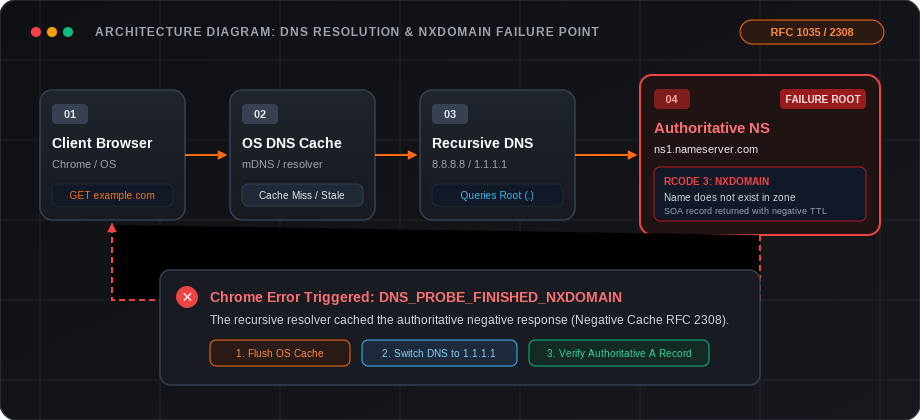
Below is the ordered triage checklist to isolate whether the fault sits in Chrome’s DoH cache, the OS stub resolver, /etc/hosts, or upstream authoritative DNS.
Client-Side Resolution Fixes (Steps 1–8)
1. Flush the Local OS Resolver Cache
Windows, macOS, and Linux retain negative (NXDOMAIN) answers per RFC 2308 for up to the domain’s SOA minimum TTL. Flush the local stub cache first:
# Windows (elevated Command Prompt / PowerShell)
ipconfig /flushdns

# macOS
sudo dscacheutil -flushcache && sudo killall -HUP mDNSResponder

# Linux (modern systemd-resolved; use systemd-resolve on older distros)
sudo resolvectl flush-caches || sudo systemd-resolve --flush-caches
2. Reset the Network Interface and DHCP Lease
VPN clients (WireGuard, Cisco AnyConnect, Tailscale) frequently leave orphaned DNS servers on an interface after disconnecting.
- Windows: Run
ipconfig /release && ipconfig /renewandnetsh int ip reset, then reboot. - macOS: Toggle Wi-Fi off for 5 seconds, or run
sudo ifconfig en0 down && sudo ifconfig en0 up. - Linux: Run
sudo systemctl restart NetworkManager(orsudo systemctl restart systemd-resolved).
3. Switch Upstream Resolvers and Check Chrome Secure DNS (DoH)
If your ISP’s recursive resolver is stale or misconfigured, switch to Cloudflare (1.1.1.1) or Google (8.8.8.8):
# Windows
netsh interface ip set dns "Wi-Fi" static 1.1.1.1 primary
netsh interface ip add dns "Wi-Fi" 8.8.8.8 index=2

# macOS / Linux (/etc/resolv.conf when not managed by systemd-resolved)
nameserver 1.1.1.1
nameserver 8.8.8.8
Important RFC 8484 (DNS over HTTPS) check: Open chrome://settings/security and check Use secure DNS. When Chrome sends DoH queries straight to a public DoH provider, it bypasses corporate split-horizon DNS and local router zones—frequently triggering DNS_PROBE_FINISHED_NXDOMAIN for internal .corp or .internal hostnames.
4. Inspect the Local Hosts File
A stale local override can shadow or break a hostname if mapped to an unreachable address or mis-formatted alias:
- Windows:
C:\Windows\System32\drivers\etc\hosts - macOS / Linux:
/etc/hosts
Remove or comment out stale entries for the affected hostname and save.
5. Disable Extensions That Intercept DNS or Proxies
Privacy extensions, ad blockers, or VPN browser extensions can inject proxy PAC scripts or rewrite requests. Test in an Incognito window or launch Chrome with extensions disabled:
chrome.exe --disable-extensions6. Clear Chrome’s Internal Host Cache and Socket Pools
Chrome maintains an internal DNS cache independent of macOS, Windows, and Linux:
- Navigate to
chrome://net-internals/#dnsand click Clear host cache. - Navigate to
chrome://net-internals/#socketsand click Flush socket pools.
7. Audit Router DNS Settings
Consumer routers often proxy DNS over unstable ISP forwarders. Log into your gateway admin panel and explicitly configure 1.1.1.1 / 1.0.0.1 or 8.8.8.8 / 8.8.4.4 upstream, then renew DHCP leases on client machines.
8. Cross-Check Another Browser or Cellular Network
If curl or Firefox resolves the domain on the same machine, the fault is isolated inside Chrome’s DoH settings or profile cache. If every device on Wi-Fi fails while cellular LTE loads the page, the issue is your router or ISP resolver.
Server-Side & Authoritative DNS Verification (Steps 9–10)
9. Trace Authoritative Records with dig, curl, and Live Lookups
When client caches aren’t the culprit, the domain itself may have expired, missing A/AAAA records, a dangling CNAME, or an unpropagated zone edit. Use our DNS Lookup tool to inspect live records, watch global convergence on the DNS Propagation Checker, and audit nameserver delegation in the DNS Zone Health Check.
Verify from the command line by comparing your stub resolver, 1.1.1.1, and the root delegation chain:
# 1. Compare local stub vs Cloudflare 1.1.1.1 (with DNSSEC check)
dig example.com A +short
dig @1.1.1.1 example.com A +dnssec

# 2. Check SOA negative caching TTL (last integer in SOA)
dig @8.8.8.8 example.com SOA +short

# 3. Trace delegation from root servers to authoritative nameservers
dig example.com +trace

# 4. Verify DoH JSON response and HTTPS reachability
curl -sH 'accept: application/dns-json' 'https://cloudflare-dns.com/dns-query?name=example.com&type=A'
curl -IsS --connect-timeout 5 https://example.com | head -n 5
If dig +trace stops at the TLD (com.) with status: NXDOMAIN or shows expired registrar NS records, verify your domain expiration status with WHOIS Lookup and validate cryptographic keys with the DNSSEC Chain Validator.
10. Escalate Managed Policy or Profile Corruption
- Reset Chrome network policies (
chrome://settings/reset) if a profile holds corrupt proxy/DoH state. - Check corporate DNS filtering (Cisco Umbrella, Zscaler, NextDNS) if
NXDOMAINis deliberately synthesized for blocked domains.
Frequently Asked Questions
Why does NXDOMAIN keep happening after I just added the A record?
Under RFC 2308, recursive resolvers cache negative NXDOMAIN responses for the duration of the zone’s SOA MINIMUM field (often 300 to 3600 seconds), regardless of the TTL on your newly created A record. If a resolver queried the subdomain before you created it, wait for the negative cache to expire or verify globally using our DNS Propagation Checker.
Can Chrome Secure DNS (DoH) cause DNS_PROBE_FINISHED_NXDOMAIN on internal domains?
Yes. RFC 8484 DoH encrypts DNS queries directly to an external provider (such as Google or Cloudflare), bypassing local DHCP-assigned corporate or VPN split-horizon resolvers. Internal hostnames that only exist on private DNS will immediately return NXDOMAIN until you switch Chrome Secure DNS to OS default or configure split-DNS exceptions.
What is the difference between NXDOMAIN and SERVFAIL?
NXDOMAIN (RCODE 3) means the authoritative server (or parent TLD) definitively states the queried domain name does not exist. SERVFAIL (RCODE 2) means the resolver encountered a broken delegation, timeout, or failed DNSSEC cryptographic validation—which you can isolate immediately with our DNSSEC Validator.
Related Cluster Guides
- Cornerstone Reference: DNS Record Types Cheat Sheet & RFC Standards
- Caching Explained: Why Does DNS Propagation Still Take So Long?
- DNSSEC Errors: Understanding DNSSEC and How to Check It
- Full Incident Playbook: My Go-To Checklist for Network Troubleshooting
Stay Ahead on Protocol Changes.
Get authoritative engineering deep dives on bulk sender requirements, post-quantum TLS, and RFC DNS standards directly in your inbox. Zero marketing fluff.
Maximum 1 dispatch per month · Unsubscribe with 1 click
Related tools
View all toolsDNSSEC Validator
Free DNSSEC validator. Verify the cryptographic chain of trust from ICANN root down to zone apex. Inspect DS records, DNSKEY public keys, and RRSIG validity.
DNS Time Machine
Free DNS Time Machine. Track DNS record changes with git-style visual diffs (+/-) and export standard RFC 1035 BIND zone files for 1-click disaster recovery.
DNS Propagation
Free global DNS propagation checker. Query A, AAAA, CNAME, MX and TXT records across 12 edge locations with expected-value matching and Geo-DNS notes.