
It’s 2 AM. Your phone buzzes. PagerDuty is firing because your primary API endpoint is “unreachable.”
Your first instinct might be to SSH into the host and start restarting systemd services blindly. Don’t do that—restarting processes destroys transient socket state and masks configuration faults. Most “mysterious” production outages trace back to a single broken layer between authoritative DNS, TCP transport, TLS negotiation, or origin routing.
Quick Verdict (TL;DR): Isolate production outages bottom-up before restarting any process: verify authoritative DNS resolution (
dig +trace), confirm TCP socket reachability on target ports (ncorcurl), inspect TLS certificate chains and expiration (openssl s_client), measure HTTP origin status and TTFB (curl -w), and check sender IP reputation across DNSBL blocklists.
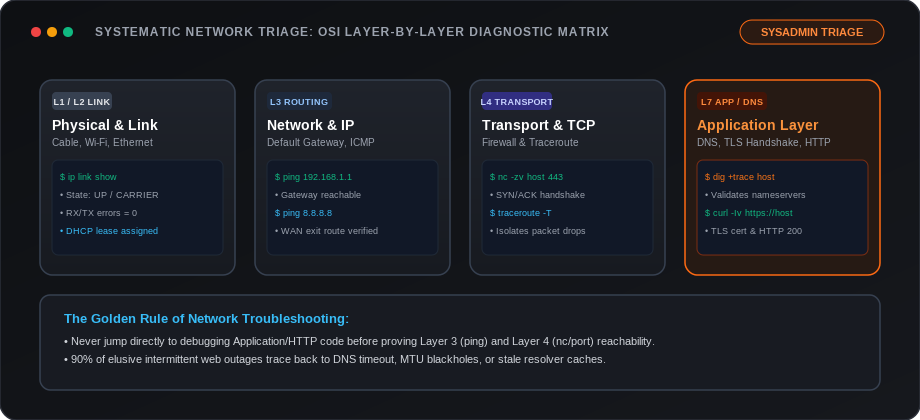
Layer-by-Layer Production Triage
Step 1: Is It DNS? (Verify Authoritative Resolution First)
Before touching firewall rules or nginx configs, confirm the hostname resolves to the right IPv4 (A) and IPv6 (AAAA) targets per RFC 1035 and RFC 3596. Expired domain registrations, unintended registrar NS updates, or broken DNSSEC DS chains (SERVFAIL per RFC 4035) look identical to server crashes from a client browser.
The Fix: Run the domain through a Full Domain Audit and check global DNS propagation. If a secondary microservice or API subdomain fails while the apex loads, run the subdomain scanner to rule out missing or dangling CNAME entries, and audit your nameserver delegation in the DNS zone health checker.
# Compare your local resolver against 1.1.1.1 and trace from the root zone
dig @1.1.1.1 api.example.com A +dnssec
dig api.example.com +trace +nodnssec
Step 2: Check Layer 3 Reachability (And Know When Ping Lies)
Once DNS resolves to the expected IP, verify network path reachability.
The Fix: Run ping -c 4 203.0.113.10 or mtr -rwzbc 10 203.0.113.10 to detect packet loss or asymmetric BGP routing hops. Keep one RFC 792 caveat in mind: many cloud security groups (AWS EC2, GCP, Cloudflare-fronted origins) intentionally drop ICMP Echo Request packets, so 100% ICMP loss does not prove the box is dead—always confirm with TCP probing in Step 3.
Step 3: Probe TCP Ports and Measure HTTP Timing
A host that answers ping can still refuse traffic if Nginx, Envoy, or a local firewall (ufw, nftables, iptables) dropped the listening socket.
The Fix: Measure real-world TCP/HTTP round-trip timing and status codes with TCP & HTTP Latency and verify transport headers with HTTP Security Headers. From your shell, separate DNS, TCP handshake, TLS handshake, and Time-To-First-Byte (TTFB) in one curl call (RFC 9110 / RFC 9114):
# Check TCP SYN/ACK on port 443 and inspect timing breakdown
nc -vz -w 3 api.example.com 443
curl -svo /dev/null \
  -w "dns:%{time_namelookup}s connect:%{time_connect}s tls:%{time_appconnect}s ttfb:%{time_starttransfer}s status:%{http_code}\n" \
https://api.example.com/health- If
connecthangs or resets: firewall rule, security group, or crashed daemon. - If
connectsucceeds fast butstatusis502/504orttfbspikes: upstream application crash or backend database pool exhaustion. - Audit HTTP transport posture (
HSTS,CSP) with our HTTP Security Headers Checker.
Step 4: Inspect the SSL/TLS Certificate Chain
Expired ACME certificates, missing intermediate CA bundles, or revoked certs cause clients and API SDKs to abort connections at the TLS handshake (RFC 8446) before sending a single HTTP byte.
The Fix: Inspect the live certificate chain, expiration window, and Subject Alternative Names (SANs) in our SSL Checker and confirm issuance locks via the CAA Policy Checker. You can also verify directly with OpenSSL:
openssl s_client -connect api.example.com:443 -servername api.example.com -showcerts </dev/null 2>/dev/null \
  | openssl x509 -noout -subject -issuer -dates
Step 5: Check IP Reputation and Reverse DNS
If your application responds over HTTPS but outbound webhooks, SMTP mail, or API callbacks fail or get rate-limited by upstream gateways, check your egress IP reputation (RFC 5782 DNSBLs and RFC 1035 PTR matching).
The Fix: Test your server’s egress IP across 7 authoritative blocklists using our IP Blacklist Checker, confirm Forward-Confirmed Reverse DNS (PTR -> A) with the Reverse DNS Validator, and inspect BGP ASN allocation in ASN Lookup.
# Verify reverse PTR and forward confirmation for an egress IP
dig -x 203.0.113.10 +short
Frequently Asked Questions
Why does a server answer ping or port 443 but still return 502 or timeout?
ICMP ping operates at Layer 3 (IP) and a TCP handshake operates at Layer 4, meaning the kernel and reverse proxy (Nginx/Caddy/ALB) are reachable. A 502 Bad Gateway or 504 Gateway Timeout happens at Layer 7 when the reverse proxy cannot talk to the crashed or overloaded backend worker process on localhost or its private upstream socket.
How do I verify whether a TLS outage is an expired leaf or a missing intermediate chain?
Run openssl s_client -connect host:443 -servername host and look at Verify return code. Return code 10 (certificate has expired) indicates an expired leaf or root, while 21 (unable to verify the first certificate) almost always means the server omitted the intermediate CA chain. Our SSL Checker flags both errors automatically.
How do I rule out local ISP resolver caching during an outage?
Compare dig example.com A (which hits your configured stub/ISP resolver) against dig @1.1.1.1 example.com A and dig @ns1.authoritative-host.com example.com A +norecurse. If the authoritative nameserver returns the new IP but your stub returns an old one, wait out the remaining TTL or check global consensus on our DNS Propagation Checker.
Keep Your Diagnostics Ready
That’s the exact diagnostic workflow behind The Network Tools: deterministic Layer 3 through Layer 7 checks without juggling OS-specific terminal syntax under incident pressure.
Related Cluster Guides
- Reference: DNS Record Types Cheat Sheet & RFC Standards
- Browser Errors: How to Fix DNS_PROBE_FINISHED_NXDOMAIN in Chrome
- Caching & TTLs: Why Does DNS Propagation Still Take So Long?
- IP Footprint: What Does Your IP Address Actually Expose About You?
Stay Ahead on Protocol Changes.
Get authoritative engineering deep dives on bulk sender requirements, post-quantum TLS, and RFC DNS standards directly in your inbox. Zero marketing fluff.
Maximum 1 dispatch per month · Unsubscribe with 1 click
Related tools
View all toolsAI Agent Audit
Free AI Agent Readiness Audit. Test GPTBot, ClaudeBot, PerplexityBot and Applebot robots.txt rules, /llms.txt, JSON-LD and Turnstile WAF blocks.
Domain Reputation
Free domain reputation check. Combine blocklist results and DNS signals to see whether a domain looks trusted for email and web.
IP Geolocation
Free IP geolocation lookup with interactive map. Inspect approximate country, region, city, timezone, coordinates, ISP and ASN for any IP address.