
Decoding the 550 5.1.1 Error
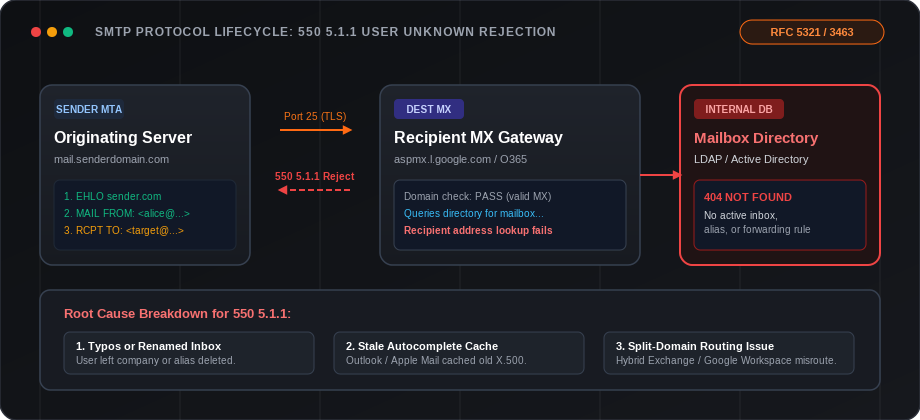
When a Mail Transfer Agent (MTA) returns 550 5.1.1 User unknown, it signals a definitive permanent rejection during the SMTP handshake (RFC 5321). Per RFC 3463 (Enhanced Mail System Status Codes), 5xx indicates a non-recoverable permanent failure and X.1.1 specifically maps to “Bad destination mailbox address”: the receiving server accepted the network connection for the domain, but found no matching mailbox or alias for the local-part before @.
Quick Verdict (TL;DR): SMTP
550 5.1.1 User unknownis an RFC 5321/3463 permanent mailbox error indicating the destination mail server accepted the domain connection but rejected the local-part address duringRCPT TO. Confirm the recipient’sMXrecords viadig, rule out typos or recently migrated inboxes, and permanently suppress repeated 5xx recipients to protect sender reputation.
While many 550 5.1.1 bounces are simple recipient typos, high-volume or post-migration spikes often signal stale MX routing, missing catch-all aliases, or an un-provisioned directory during a workspace transition.
Verifying the Destination Domain and MX Routing
Before altering your own outbound MTA configuration, confirm whether your mail queue is connecting to the right destination server.
Inspect the recipient domain’s MX records using our MX Record Inspector. Per RFC 5321 Section 5.1, if a domain publishes MX records, mail routes strictly to the lowest-priority MX hostname; only when zero MX records exist does SMTP fall back to the apex A/AAAA record. If you recently migrated your own domain to a new mail host and external senders receive 550 5.1.1, stale DNS caches may still be delivering mail to your old host where mailboxes were already deleted.
Verify your own domain’s authentication and mail readiness below, or run the full 8-point Email Health Scorecard:
Developer Utility · MAIL-TESTER
Mail Tester Workbench
Send a test mail, get a deliverability score
Provisioning isolated testing mailbox...
Analyzing the Raw SMTP Handshake with dig and openssl
Confirm the target MX host and simulate an SMTP RCPT TO negotiation over STARTTLS (RFC 3207) from your terminal without queuing an actual email:
# 1. Resolve the recipient domain's MX priorities and host A record
dig recipient.com MX +short
dig mail.recipient.com A +short

# 2. Open an encrypted STARTTLS SMTP session on port 25
openssl s_client -starttls smtp -connect mail.recipient.com:25 -crlf
Inside the interactive SMTP session, issue:
EHLO yourdomain.comMAIL FROM:<bounce-test@yourdomain.com>RCPT TO:<user@recipient.com>QUIT(always exit cleanly beforeDATAso no message is transmitted)
If the remote MTA replies 250 2.1.5 OK to RCPT TO, the mailbox exists and accepts routing from your host. If it replies 550 5.1.1, the recipient MTA has no active mailbox or alias for that address. Note that some enterprise gateways mask user enumeration or block unrecognized relays—also inspect raw bounce headers in our Email Header Analyzer to verify which exact hop (Remote-MTA) emitted the 550.
Common Causes and Remediation
1. Recipient Typos and Non-Standard Case Sensitivity
Although RFC 5321 Section 2.4 declares that the local-part of an email address can be interpreted case-sensitively by the receiving host (even though most modern providers normalize it), legacy Unix MTAs and custom directory lookups occasionally fail on mixed-case addresses. Validate address syntax before enqueueing and strip accidental trailing whitespace or smart-quotes.
2. Stale MX Records During Mail Migrations
If you recently switched from cPanel/Postfix to Google Workspace or Microsoft 365, external resolvers with long MX TTLs may still route mail to the decommissioned server. Always lower MX TTLs to 300 seconds before cutover (see our DNS Migration Checklist) and confirm global convergence on the DNS Propagation Checker.
3. Missing Aliases, Distribution Lists, or Catch-All Rules
When an employee leaves or a SaaS workspace alias (billing@, support@) isn’t recreated after a tenant migration, the receiving MTA rejects every incoming message with 550 5.1.1. On self-managed Postfix/Exim hosts, verify /etc/postfix/virtual maps and run postmap after edits.
4. Split-Delivery Misconfiguration
In hybrid mail deployments (e.g., routing part of a domain to Google Workspace and part to a legacy relay), forgetting to forward unknown local-parts to the secondary smart-host causes the primary gateway to immediately emit 550 5.1.1.
Preventing Deliverability Degradation From 5xx Bounces
Repeatedly attempting delivery to invalid 550 5.1.1 addresses signals poor list hygiene to Gmail, Yahoo, and Microsoft anti-spam scoring systems:
- Hard-Bounce Suppression: Automatically suppress any recipient returning
550 5.1.1on the first permanent failure—never retry5xxcodes like transient4xx(450/421) greylisting responses. - MTA Log Alerting: Monitor spikes (
grep "550 5.1.1" /var/log/mail.log) by destination domain so sudden waves flag broken corporate relays or stale workspace migrations immediately. - Authentication Hygiene: Ensure your domain also passes SPF validation, DKIM verification, and DMARC policy enforcement so legitimate notifications aren’t confused with spoofed bounce-backscatter.
Frequently Asked Questions
Why does 550 5.1.1 happen right after a domain or workspace migration?
Two things usually happen during a migration: either the new mail host lacks a legacy alias (sales@ or hello@) that existed on the old host, or external senders are still hitting the old mail server due to cached MX records after mailboxes were turned off there. Check live MX propagation with the DNS Propagation Checker.
Does SMTP RCPT TO probing reliably check if an email address exists?
Usually yes, but not universally. Some catch-all servers accept every RCPT TO at the perimeter and emit a non-delivery report (NDR) asynchronously later, while Microsoft 365 and hardened gateways may reject unauthenticated probes with 550 5.7.1 policy errors before validating the mailbox.
How does a 550 5.1.1 bounce differ from 550 5.7.1?
550 5.1.1 means the destination mailbox does not exist (Bad destination mailbox address). 550 5.7.1 means delivery was rejected by security policy—such as failing SPF/DKIM/DMARC alignment or a blocklisted IP. Read our 550 5.7.1 Service Unavailable troubleshooting guide if you see 5.7.1.
Remediation Summary
Resolving 550 5.1.1 requires fixing the root cause rather than retrying failed deliveries: verify the destination MX target with dig, reproduce the RCPT TO exchange over openssl s_client, restore any missing post-migration aliases, and suppress invalid addresses from future mail runs.
Related Cluster Guides
- Policy Rejections: How to Fix 550 5.7.1 Service Unavailable Error
- Spam Prevention: Why Legitimate Emails Go to Spam (SPF, DKIM & DMARC)
- Zero-Downtime Moves: DNS Migration Checklist
- Pillar Reference: DNS Record Types Cheat Sheet (MX, SPF, DKIM, DMARC)
Stay Ahead on Protocol Changes.
Get authoritative engineering deep dives on bulk sender requirements, post-quantum TLS, and RFC DNS standards directly in your inbox. Zero marketing fluff.
Maximum 1 dispatch per month · Unsubscribe with 1 click
Related tools
View all toolsSpam Checker
Free email deliverability test. Check SPF, DMARC, MX and blacklist signals for your sending domain and get fix steps for each issue.
DMARC Analyzer
Free DMARC checker. Inspect _dmarc TXT records, validate p=none/quarantine/reject policies, check RUA/RUF reporting tags, and eliminate email spoofing.